EENSONICCOMPUTECH PVT. LTD.Request a classroom or auditorium consultation ↗

Ensonic expertise

Digital Learning Infrastructure for Schools, Colleges & Universities

Integrated technology environments designed to make teaching, content delivery and classroom management simpler.

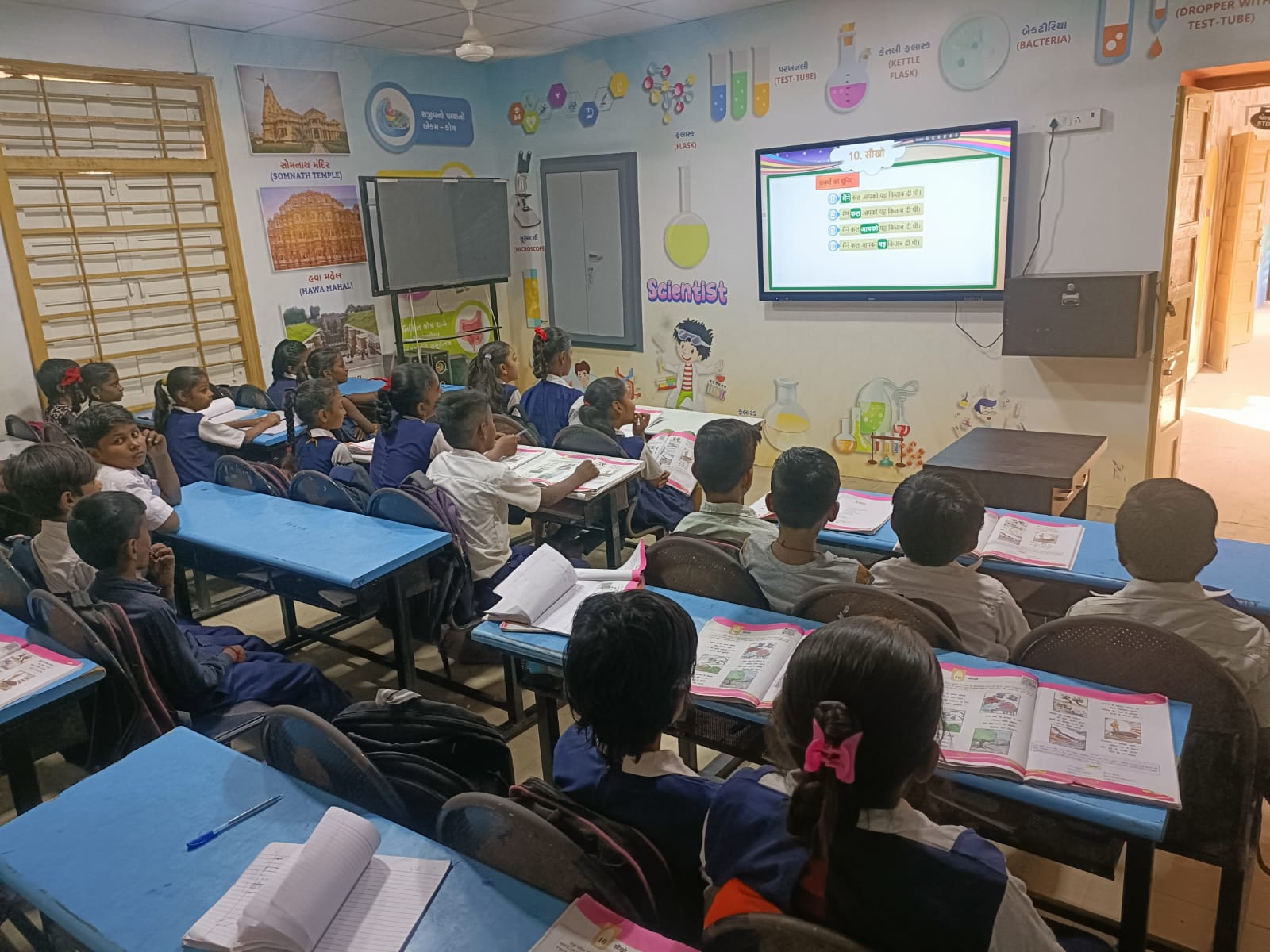
An Ensonic digital learning environment with an interactive display
Integrated digital learning environment

Learning Technology, Made Easier to Adopt.

The focus is not only on installing equipment. The objective is to create a learning environment that teachers and institutions can adopt and use confidently.

The complete environment

Plan the complete classroom around teaching.

A digital classroom works well only when the teacher can move naturally between explanation, interaction, content and assessment. Ensonic designs the complete environment around this everyday teaching flow, bringing the display, classroom audio, content access, recording and control together in one practical system.

The solution can support smart and hybrid classrooms, interactive teaching, classroom recording, Class Flow content viewing and eLibrary access. Centralised device management, teacher orientation and lifecycle support help institutions move from installation to sustained use.

A technology-enabled classroom designed for practical teaching
Designed around everyday teaching needs

Designed for teaching

The room layout, display experience, content access and control interfaces are planned so that technology supports the lesson instead of interrupting it. The result is a familiar teaching environment with stronger digital capability.

Content within easy reach

Class Flow, eLibrary and local or central content repositories can be connected to the classroom experience. Teachers can reach relevant resources with fewer steps, while institutions retain a structured way to organise and manage content.

Adoption beyond installation

Site assessment, integration, commissioning, teacher training, central monitoring and continued support are treated as connected responsibilities. This helps the institution maintain consistency across rooms and locations over time.

Video demonstrations

Classroom displays, teaching tools and integration

Solution planning

Use cases, scope and implementation.

The final design depends on the institution, site and project requirements. These points provide a practical starting framework.

Where it fits

  • Smart classrooms in schools, colleges and universities
  • Hybrid teaching and shared lecture spaces
  • Multi-room learning environments that need consistent operation

Potential scope

  • Interactive displays, classroom audio, cameras and room controls
  • Class Flow content viewing, eLibrary access and lecture recording
  • Device management, commissioning and teacher orientation

Implementation approach

  1. Review room conditions, connectivity, users and teaching goals
  2. Plan an integrated room design and equipment schedule
  3. Install, configure and test the classroom environment
  4. Hand over with user orientation and an agreed support path

Examples are planning options. Service availability, location coverage, delivery schedule, support and commercial terms are confirmed for each project before a proposal is agreed.

Before procurement

Specify the classroom before selecting the equipment.

Define the teaching workflow and room conditions

Start with the class size, seating layout, viewing distance, ambient light and the way teachers use the room. Identify which lessons need annotation, presentation, demonstrations or participation from remote learners. A shared teaching room and a dedicated recording classroom may need different camera, microphone and control arrangements.

Record the existing display, computer, audio, network and power infrastructure before requesting a proposal. Identify equipment that should be retained and interfaces that need to be checked. This helps the institution compare complete classroom scopes rather than comparing a panel price with a proposal that also includes audio, integration and training.

Connect teaching, content access and room operation

A smart classroom proposal should describe how the teacher opens learning resources, shares a source, annotates a lesson and controls the room. Specify the content formats, access permissions, network conditions and software licences that need to be assessed. Class Flow and eLibrary requirements should be evaluated within that workflow, with the detailed content-platform scope kept separate from the room specification.

If hybrid teaching or lecture recording is required, document who needs to be seen and heard, where remote participants join and how recordings will be handled. For several classrooms, agree which controls and settings should be consistent. Device monitoring, user permissions and update responsibilities should be stated where they form part of the proposed solution.

Compare proposals through demonstrations and handover checks

Ask for a demonstration using representative teaching material. Check readability from the back of the room, speech clarity, source changes and the teacher's normal operating sequence. Where included, test remote participation, a sample recording and access to learning resources under the institution's actual connectivity conditions.

Compare the equipment schedule, integration responsibilities, licences, installation assumptions, teacher orientation and acceptance checklist. Confirm warranty terms and support arrangements in the written proposal instead of assuming that every quotation includes the same services. In your enquiry, include the institution, location, number of rooms, existing equipment and the teaching tasks the upgrade should make easier.

Education-first planning

Students first. Teachers next. Management always.

Understand the institution before selecting equipment

A smart classroom begins with the people who will use it. Ensonic first discusses students’ educational level, subjects, learning requirements and language preferences. We then consider how teachers conduct lessons, their familiarity with digital tools and the training they need. Management’s objectives, budget, implementation requirements and plans for ongoing operation complete the brief. Technology recommendations follow these questions rather than starting with a catalogue.

The classroom environment also matters. Internet availability, electrical readiness, ventilation, temperature, dust and equipment security can affect the proposed approach. Offline-capable resources depend on compatible equipment, content, licensing and configuration. Regional-language resources can be considered where suitable materials are available. Digital familiarity varies between individuals; it should not be assumed from an institution’s location.

Address three practical adoption challenges

Simplicity comes first: teachers should be able to open resources, write, present and move between activities without unnecessary steps. Content flexibility is the second consideration. Institutions should check supported formats, editing options and compatibility with their syllabus and teaching languages instead of relying entirely on generic preloaded resources.

The third challenge is support and continuity. A proposal should explain how teachers request assistance, what troubleshooting guidance is available and how teaching can continue if a component becomes unavailable. Training may combine demonstrations, remote sessions and instructional videos; customized videos depend on the agreed project scope. Remote or on-site assistance, geographic coverage, warranty terms and any service commitments must be confirmed for each institution.

Our smart classroom buying guide for schools and colleges explains these decisions and the questions to ask before comparing proposals. Request a smart classroom consultation with your teaching requirements and existing infrastructure.

Technology That Works for Teaching

At Ensonic Computech, we believe digital learning infrastructure should be planned around students, teachers and institutional requirements, not simply a list of devices. We begin by understanding what the institution wants to achieve, the available teaching resources, the classroom environment and the support teachers will need.

Our approach supports relevant priorities of India's National Education Policy (NEP) 2020, including meaningful use of educational technology, accessible resources, teacher preparedness and multilingual learning. Equipment and implementation are selected for the institution's requirements; procurement eligibility is assessed separately.

Smart Classroom Solutions for Schools

An effective smart classroom brings teaching hardware and useful educational resources into one practical workflow.

The interactive flat panel is the central teaching display. On compatible Android interactive panels, Class Flow can run as an installed teaching application, helping teachers open PDF textbooks, navigate chapters, annotate lessons and access AI-assisted chapter questions within the same environment.

The complete proposed solution can include suitable interactive flat panels, properly licensed or institution-supplied teaching materials, Class Flow where appropriate, teacher training, installation and agreed technical support.

Class Flow's PDF viewing, navigation and annotation work offline on supported devices. Generating new AI questions requires connectivity, registration and active online access; previously generated question sets may be available from the cache where present. Capabilities depend on panel/software compatibility and available content.

We plan around school type, student needs, curriculum and language, teacher familiarity, internet reliability, classroom environment and budget. Explore Smart Classroom Solutions for Schools.

Customized Digital Podium Solutions for Colleges, Universities & Auditoriums

For college teaching spaces, university lecture theatres, seminar halls and auditoriums, Ensonic offers digital podium configurations that can be adapted to the venue and presenter workflow.

Depending on model and project scope, customization may cover the podium body, colour, institutional logo, display/touchscreen size, computer configuration and integrated controls. Configurations range from basic digital podiums to automation-enabled presentation systems.

Where compatible equipment and necessary control interfaces are available, an integrated controller can operate selected room systems such as displays and interactive panels, computers, cameras, audio, fans, air-conditioning and motorized curtains.

Confirm the exact quoted model, equipment interfaces and proposed integration scope before selecting a configuration. Explore Digital Podium Solutions for Colleges & Auditoriums.

Consultation, Installation, Training & Support

We begin with the institution's objective, review existing infrastructure and recommend appropriate technology and workflows. Training may include demonstrations, online sessions, instructional videos and institution-specific materials where agreed. Support options can include telephone, WhatsApp, remote assistance and on-site services subject to the agreed service scope and availability.

Read the official National Education Policy 2020, particularly section 4.46 and sections 23.5–23.6.
Discuss your project

Compare complete smart classroom proposals

A panel, a teaching application and a complete classroom installation are different procurement scopes. Compare the teacher’s daily workflow and the room’s audio, content and control requirements before comparing equipment totals.

Request a classroom or auditorium consultation ↗

The adoption objective

The focus is not only on installing equipment. The objective is to create a learning environment that teachers and institutions can adopt and use confidently.

Related solutions

06Content Access and Digital Libraries→07Device Management→08Deployment and Lifecycle Support→
View all solutions →

Start a conversation

Tell us the requirement.
We’ll simplify the solution.

Request a classroom or auditorium consultation ↗info@ensonic.in+91 92519 38024Use the enquiry form